We’re here with another update for Amped DVRConv, the fastest way to batch convert proprietary video files!

In this update, you’ll notice a few more parameters within the Program Options menu!

We continually strive to adapt our software to suit each of your format and conversion needs, should you have a specific format required as part of your operating procedures, policies or to fit in with your workflow. We’ve now added MPEG2TS-H.264 as a new output format and container, giving you more choice as to the type of files following a conversion.
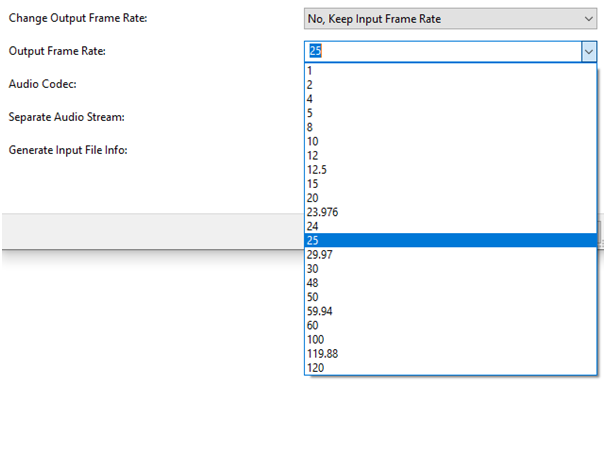
You’ll see there is now also the option to have DVRConv change the output frame rate during a conversion. Under Change Output Frame Rate, you’ll see the following options:

- No, Keep Input Frame Rate – This will make sure that the conversion involves no alteration of the original frame rate of the video.
- Yes, if Input Frame Rate is Undefined – This will alter the frame rate when the original video frame rate has not been identified within the data. Normally, if this is Undefined, it is set by default to 25 fps.
- Yes, always – This will alter the frame rate for each conversion based on the selected Output Frame Rate parameter. Especially useful if you need to convert files quickly into a specific DVD format, as an example.
Below this is the Output Frame Rate option, providing you with a selection of common and uncommon frame rates to choose from for your converted files:
We’ve also added a log text file to the Output folder alongside your converted files, detailing the input file data should you need it for your records, continuity or as part of your operational procedures.
There’s more! Alongside this, and as always, we’ve added support for 8 new file formats, 39 new variations of existing, already supported file formats, and 12 new timestamp formats! We tirelessly continue our research and development into new and existing proprietary formats to make sure we help dealing with video easier, less trial and error and more successful cases!
The full list of supported formats can be found in the Amped DVRConv user guide after clicking the Help button when running the application.
So, what are you waiting for?
Don’t Delay – Update Today
If you have an active support plan you can update straight away by going into the menu About>Check for Updates within Amped DVRConv. If you need to renew your SMS plan, please contact us or one of our authorized distributors.